Give your AI more. Give away less.
Stash a tab, a link, a video — one click. Then hand the box to the AI you already use. It only ever gets what you put in.
20 / 20
beta seats
Get started right now: Chrome extension · Safari extension (beta) · Open your inbox · Instagram
Your AI is only as good as what it knows about you
Everyone tells you to give it more context. The tools that offer to help want your whole inbox, your entire watch history, your screen — always on. So you don’t. You paste one link, ask one question, and move on, and the smartest tool you own stays a stranger. That’s the trust tax, and it is why most people use AI at a fraction of what it could do for them.
Sources
Stash from anywhere
A tab you left open. A link in a chat with yourself. A video you saved to watch later. SourceBox is built to catch all of it in one place.
In your browser
- Chrome
- Whale
- Edge
- Safari
- Firefox
From your apps
- KakaoTalk
- YouTube
- TikTok
Live in Chrome and Firefox today. Safari and the iOS app are in TestFlight beta — the rest is on the way.
One click
Stashing costs you one click
Every tab you keep open is a promise to come back later. One click stashes all of them — titles, links, and when you saved them — and you can close the window and lose nothing. Cheap enough that the box actually fills up, which is the only way any of the rest of this works.
Everywhere
It's wherever you are
The link you DM yourself is a bookmark in disguise. SourceBox gives every stash one home — a single inbox you open from any device, instead of a trail of messages to yourself.
- Chrome
- Firefox Available now
- Safari
- iOS app
- Android app Coming soon
The payoff
In progressHand it to the AI that already knows you
Not a new assistant to train — the one you already pay for. We’re building toward handing your stash, transcripts included, to Claude, Codex, or Gemini, so acting on what you saved takes one ask. You mint the token, you set what it can reach, and you can revoke it. YouTube first; Instagram and TikTok next.
Privacy
Nothing leaves the box
A browser can only warn you about what an extension is able to do, in the strongest words available. So here is what SourceBox actually does — and the part you can check for yourself before you install anything.
I only keep what you hand me.
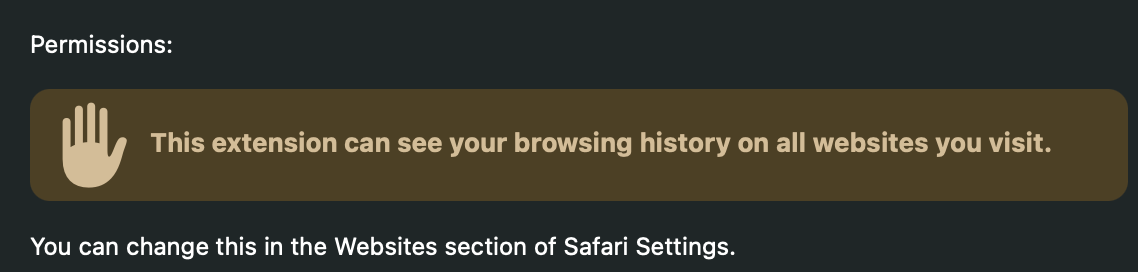

| The warning is about | What SourceBox does |
|---|---|
| Seeing every page you visit | Reads only the tab you stashed |
| Reading what is on the page | Never — it asks for no site access |
| Running in the background | Nothing happens until you click |
| Keeping a record of it | The title, the link, and the time |
Other AI tools ask for your whole inbox, your entire watch history, always-on access to your screen.
SourceBox asks for the link you just put in the box.
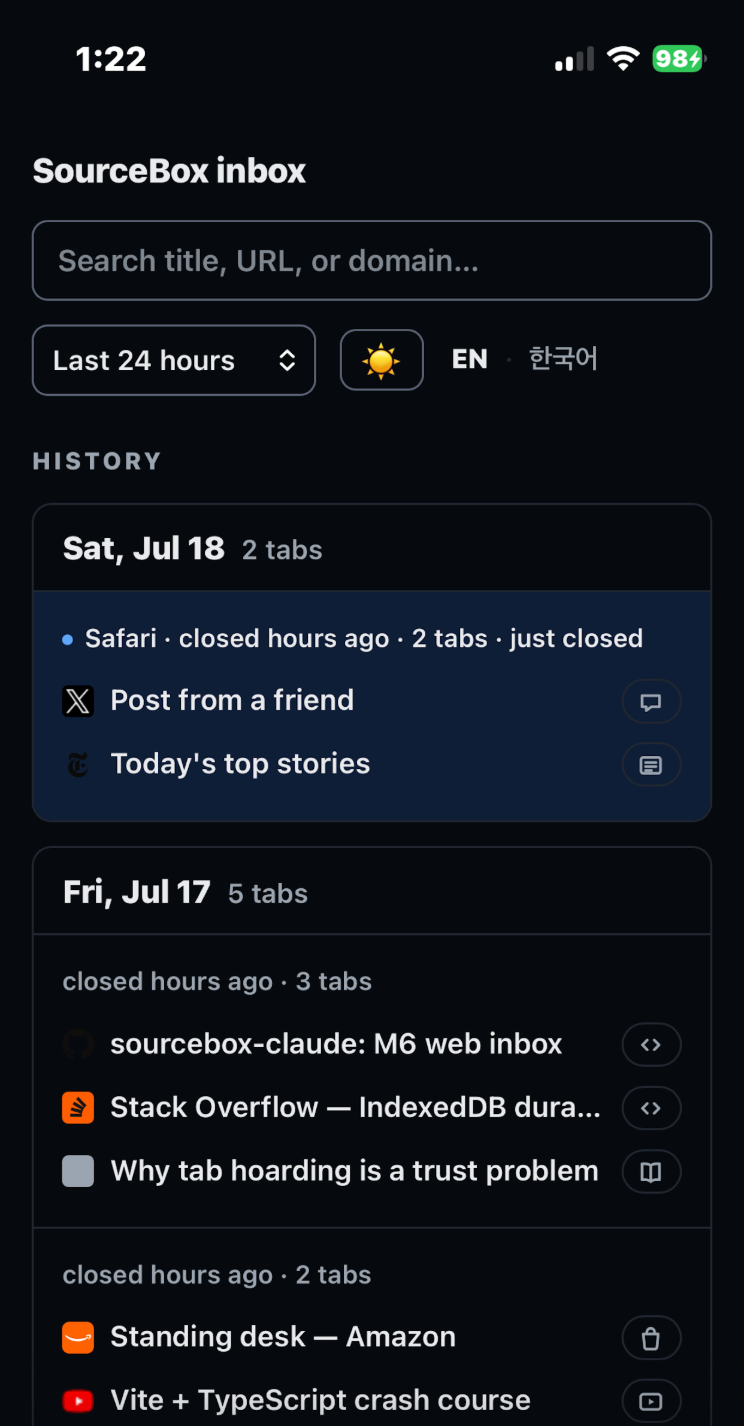
The inbox
This is what it looks like
Frequently asked questions
What is SourceBox?
A browser extension and a web inbox. One click stashes every open tab — title, link, and when you saved it — then you can close the window. Everything lands in one inbox you can open from any device. It's not an email app, a bookmark folder, or a note-taking tool.
What can the extension actually see?
It requests three browser permissions — tabs, storage, and alarms — and no access to website content. It reads a tab’s title and URL at the moment you stash it. It cannot read what is on the page, because it never asks for permission to.
Why should I allow it on every website?
Only in Safari, which gates tab access site by site. Approve per site and Safari re-asks constantly, and any tab on a site you haven’t approved is quietly skipped when you stash — the friction that makes people give up. “Every website” lets one click catch any tab. It does not widen what we receive: the extension declares no content scripts and no site permissions, so there is nothing of ours running inside a page to read it. Chrome never asks this way.
What happens to my data?
Captures are stored for your account only: titles, links, and timestamps. No page contents, no browsing history, no tracking across sites. Read the privacy policy
Do you train on my data?
No. No advertising, no profiling, no analytics, and no third-party trackers. We never sell or rent your data.
What is the AI part?
A roadmap, stated honestly. We're building toward handing what you save — transcript included — to the AI that already knows you, starting with YouTube videos; Instagram and TikTok come after. Until it ships, it wears an “In progress” badge.
Which AI does this work with?
The one you already use. The hand-off is being built on MCP — the tool protocol Claude, Codex, and Gemini already speak — plus a skill for each. You mint a scoped token from your settings, decide what it can reach, and revoke it whenever you like. Roadmap, not shipped.
Which browsers and devices work today?
Chrome and Firefox now. Safari and the iOS app are in TestFlight beta — you can join either today. Android is coming. The inbox itself is a website — you can already open it from any device.
What does the beta cost?
Nothing. The beta is capped at 20 seats so we can stay close to every user. Once seats fill, the same form joins the waitlist.
Is this an email tool?
No. You sign in with a code sent to your email, but SourceBox never reads, sends, or manages email. The inbox holds what you stash — nothing else.